
Table of Contents
Introduction
One really awesome way to automate things in GitHub is using IssueOps in it. This open up a whole new world how you can automate almost anything in your workspace, product, organisation you name it. Lets step into what is IssueOps
What is IssueOps
In simple terms IssueOps is a way to trigger different workflows based on some criteria setup in your repository that can be triggered from an Issue. What is consists of is an Issue, that would be ideally create from an Issue Template so you can guide the user to write what is needed and Actions that will be triggred from that issue. Simples as that.
Setting up Issue ops
Issue Template
Lets start with creating an issue template. In your repository you need create file under .github/ISSUE_TEMPLATE folder. THere are two issue templates that can be created. One is the old way using the Issue Template that required creating a YOUR_ISSUE_TEMPLATE.md file under the folder. The down side using this way is taht wehn an issue is created with this tempalted it is very fragile on what content you could/should edit because you might have a parses created for that issue and if that is expecting on certain format of the issue context then you might break the whole thing.
The second option is to use Issue Form Templates that is available for public repositories, and soon for private I hope. For this to work you need to create a YOUR_ISSUE_TEMPLATE.yml file under the same directory. You can read more here
Sample issue form template:
name: Name of your template
description: Short description of what it does
title: "GitHub setting up IssueOps"
labels: ["CanAddLables"]
body:
  - type: "input"
    attributes:
      label: "Hello!"
      description: "Whom should we greet?"
      placeholder: "World"
    validations:
      required: true
  - type: textarea
    id: txtArea
    attributes:
      label: Large area for text
      description: Here we could aske the customers to enter some multi-line values
      render: csv
      placeholder: |
        value-one
        value-two
    validations:
      required: true
Note: To see more supported types, go see the documentation

Workflows and Scripts
Now that we have created an issue template we can move on to create the workflows that will do the actions.
Prepare workflow
- Lets create a worfklow that will parse the issue and give feedback what it found and what you could do further. Create the workflow here
.github/workflows/prepare.yml
name: Initial prepare message

on:
  issues:
    types: [opened, edited]

jobs:
  prepare:
    name: Prepare
    runs-on:  ubuntu-latest

    if: github.event_name == 'issues' &&
      (github.event.action == 'opened' || github.event.action == 'edited')

    steps:
      - name: Check out scripts
        uses: actions/checkout@v2

      - name: Dump GitHub context
        env:
          GITHUB_CONTEXT: ${{ toJson(github) }}
        run: echo "$GITHUB_CONTEXT"

      - name: Post prepare message
        uses: actions/github-script@v5
        with:
          script: |
             const options = { myVariable: '${{ secrets.MY_SECRET }}' }
             await require('./.github/scripts/prepare.js')({github, context, options})
      - if: ${{ failure() }}
        name: Report failed migration
        uses: actions/github-script@v3
        with:
          script: |
            const body = `:no_entry: **Prepare step failed.** [View workflow run for details](${context.payload.repository.html_url}/actions/runs/${context.runId})`
            github.issues.createComment({
              issue_number: context.issue.number,
              owner: context.repo.owner,
              repo: context.repo.repo,
              body
            })
Note: We can pass in secrets or other type of data if needed.
Prepare script
- Lets create the dependent script now. We will create a sciprt under
.github/scripts/prepare.js. The content for this will be the following:
const parseIssueBody = require('./parse-issue-body.js')

module.exports = async ({github, context, options}) => {
  const { whoToGreet, mutliLineValues } = parseIssueBody({context})
  let commentBody

  if (whoToGreet) {
    commentBody = `👋 Thank you for opening this issue.

    The following **data** has been parsed from your issue body:

    \`\`\`${mutliLineValues}\`\`\`

    The **Who to Greet** is set to be: **\`${whoToGreet}\`**

    ## Greet

    Add a comment to this issue with one of the following command in order to send greetings.

    \`\`\`
    /send-greetings
    \`\`\`
    `
  } else {
    commentBody = '😢 The issue body could not be parsed. Please open a new issue using an issue template.'
  }

  await github.rest.issues.createComment({
    issue_number: context.issue.numberc,
    owner: context.repo.owner,
    repo: context.repo.repo,
    body: commentBody.replace(/  +/g, '')
  })
}- Inside the script we call another script file that will handle the parsing. Create
parse-issue-body.js
module.exports = ({context, core}) => {
    const issueBody = context.payload.issue.body;

    const parsedWhoToGreet = issueBody.match(/### Hello!\s+(?<whoToGreet>[^\s]+)\s/);
    const parsedMutliLine = issueBody.match(/### Large area for text\s+```csv(?<multiLine>[^`]+)```\s/);

    if (core) {
      if (parsedWhoToGreet) {
        core.setOutput('who-to-greet', parsedWhoToGreet.groups.whoToGreet);
      }
       if (parsedMutliLine) {
        core.setOutput('mutliline-values', parsedMutliLine.groups.multiLine.trim());
      }
    }
    let result = {
      whoToGreet: parsedWhoToGreet.groups.whoToGreet,
      mutliLineValues: parsedMutliLine.groups.multiLine

    };
    return result;
  }
Extending with triggering with issue comments
- Now that we have created a base for the workflows we will add one more workflow that will be triggered when a comment (command) is added in the issue.
- Create a workflow
.github/workflows/add-commands.yml:
name: Send greetings

on:
  issue_comment:
    types: [created]

jobs:
  send-greetings:
    name: Send greetings
    runs-on: ubuntu-latest

    if: github.event_name == 'issue_comment' &&
      startsWith(github.event.comment.body, '/send-greetings')

    steps:

      - name: Check out repository for scripts
        uses: actions/checkout@v2

      - name: Parse issue body
        id: parsed-issue
        uses: actions/github-script@v5
        with:
          script: |
            const result = require('./.github/scripts/parse-issue-body.js')({context, core})
            return result

      - name: Send Greetings
        uses: actions/github-script@v3
        with:
          script: |
            const body = `👋 Hello **\`${{ steps.parsed-issue.outputs.who-to-greet }}\`** !!`
            github.issues.createComment({
              issue_number: context.issue.number,
              owner: context.repo.owner,
              repo: context.repo.repo,
              body
            })

      - if: ${{ failure() }}
        name: Report failed migration
        uses: actions/github-script@v3
        with:
          script: |
            const body = `:no_entry: **Sending greetings failed.** [View workflow run for details](${context.payload.repository.html_url}/actions/runs/${context.runId})`
            github.issues.createComment({
              issue_number: context.issue.number,
              owner: context.repo.owner,
              repo: context.repo.repo,
              body
            })
Executing the workflows
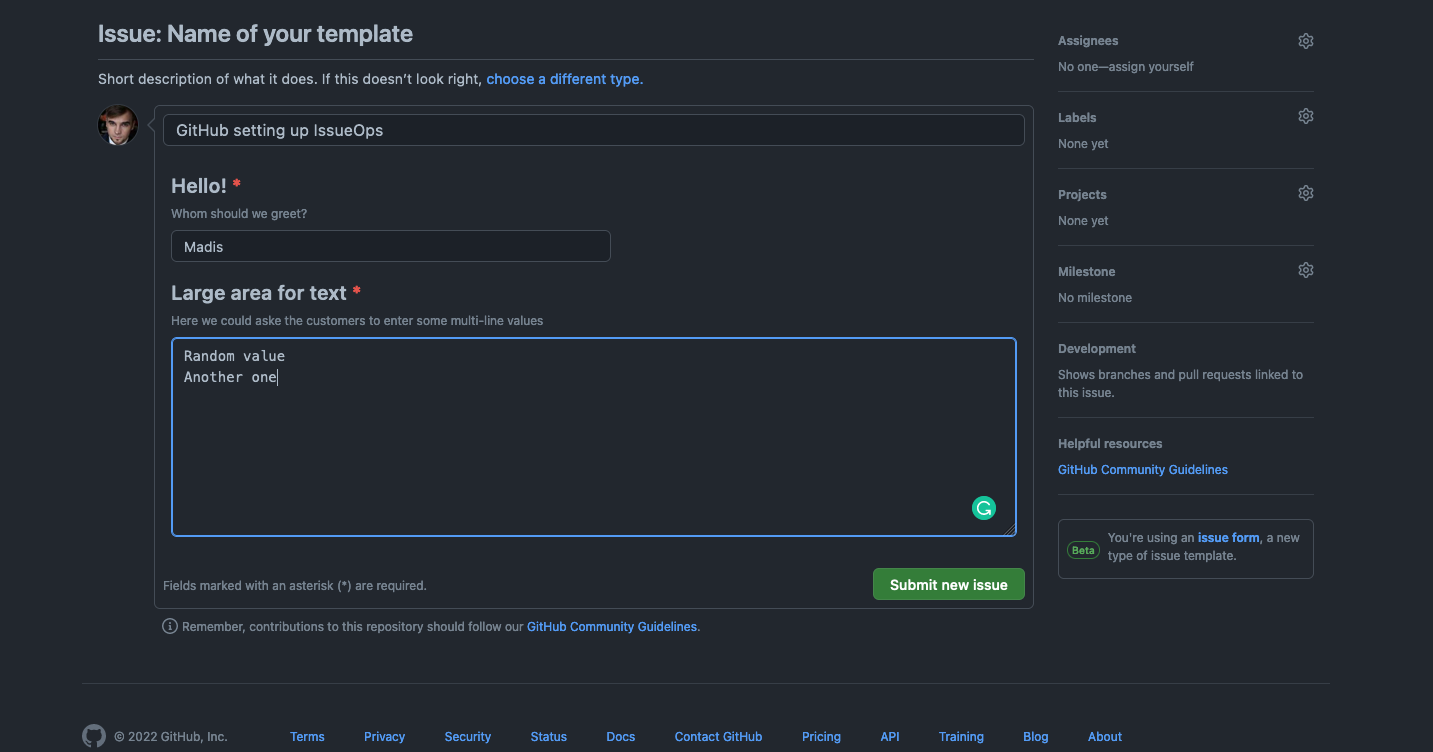
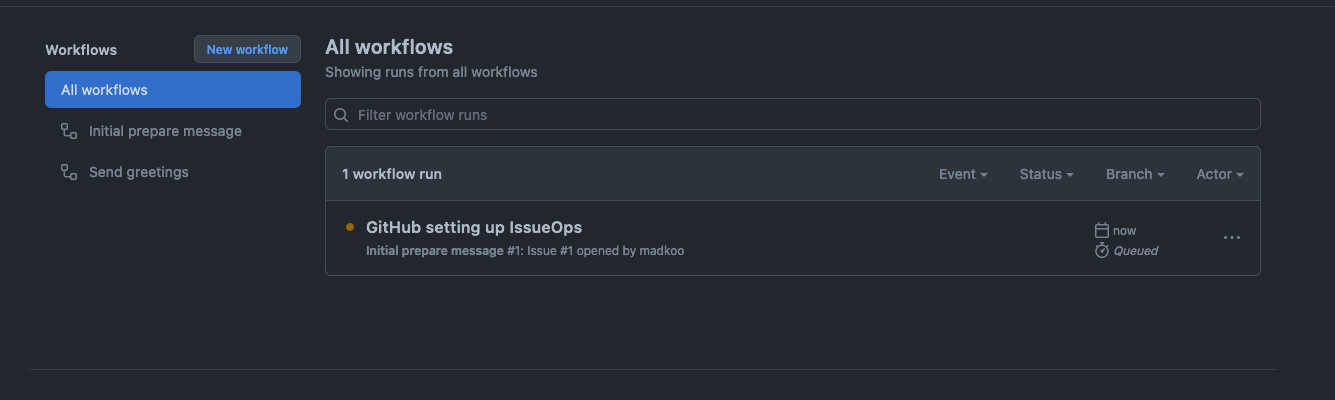
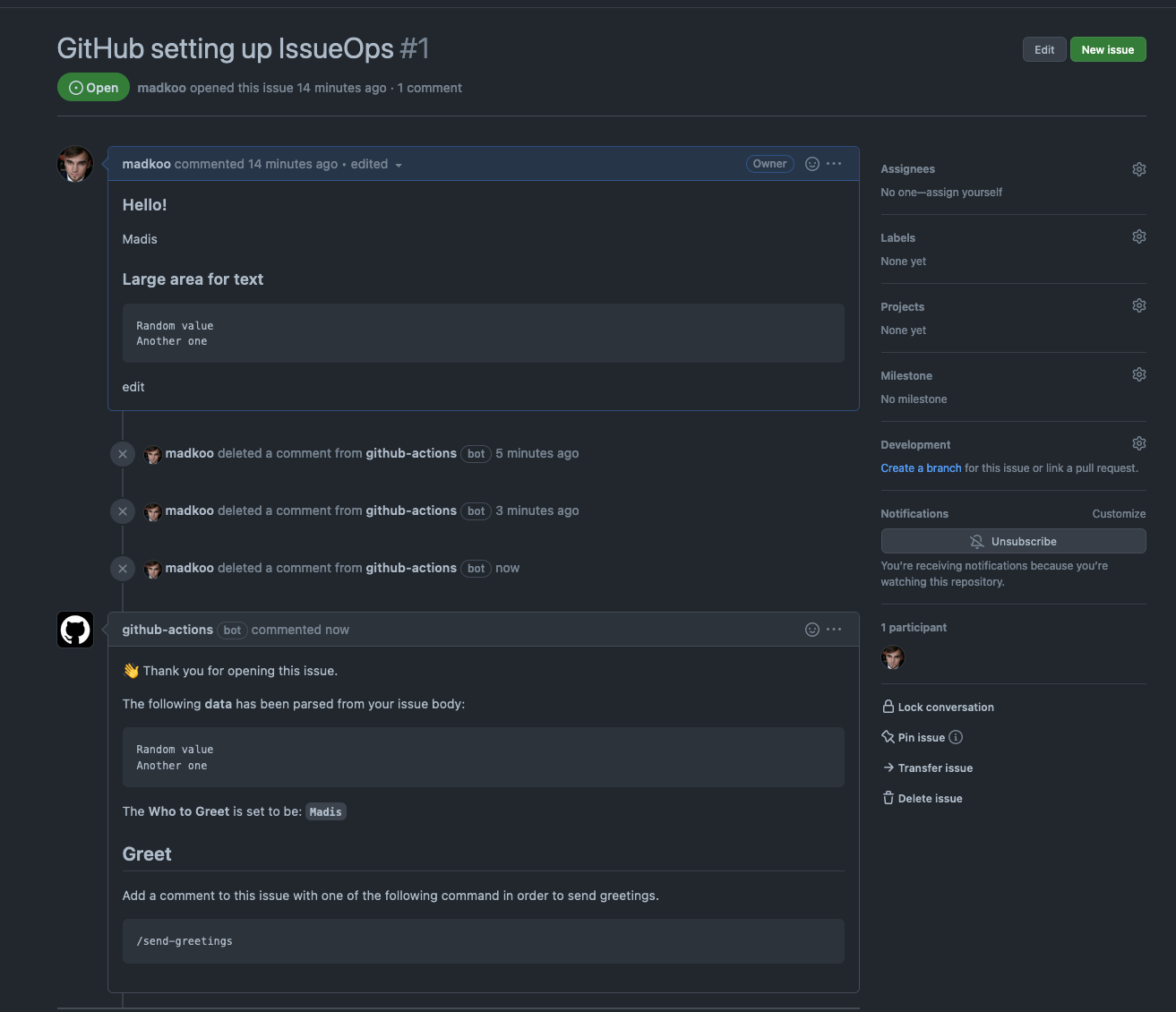
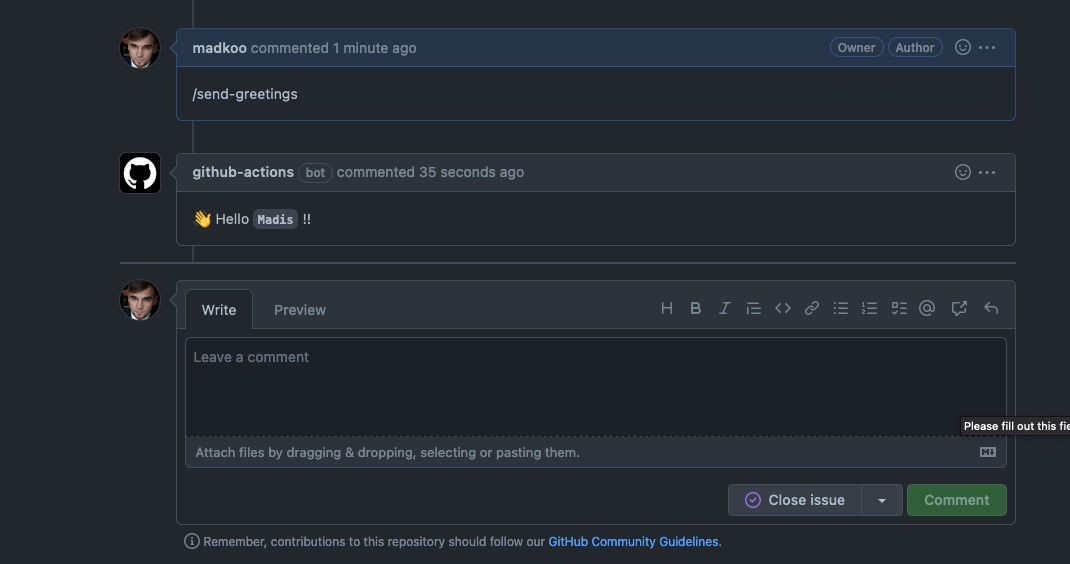
Now that we have eveyrhting setup we can start executing the workflows.


And there you have it, a very simple setup that could be extened in any way you can imagine.
