
Customize the GitHub Copilot CLI status line with your own session information
- Customize the GitHub Copilot CLI status line with your own session information
- Why customize the status line?
- What we are going to build
- Prerequisites
- Step 1: Enable a custom status line in Copilot CLI
- Step 2: Point Copilot CLI to your script
- Step 3: Create the status line script
- Step 4: Build a useful usage and cost status line
- What the script displays
- A few notes before you rely on the numbers
- Conclusion
The default GitHub Copilot CLI experience already gives you a lot, but when you spend a lot of time in the terminal, small bits of context can make a big difference. I wanted my Copilot CLI status line to show information that helps me understand the current session at a glance: context usage, model name, estimated cost, and elapsed time.
This post walks through how I customized the Copilot CLI status line with a shell script. We will start with a simple “hello world” status line, inspect the payload that Copilot sends to the script, and then build a more useful version that formats session information into a compact status line.
Why customize the status line?
When I work with Copilot CLI, I often want answers to a few quick questions without digging through settings, logs, or payloads:
- How much of the context window am I using?
- Which model is currently active?
- How long has this session been running?
- Is there enough usage data available to estimate cost?
None of these things are difficult to find individually, but having them visible in the status line makes the CLI feel much more useful. It is a little bit like adding a dashboard to your terminal: not required, but once it is there, you miss it when it is gone.
What we are going to build
The final status line will look something like this:
🧠 █████░░░░░ 50% 64.0k/128.0k | ✱ Sonnet 4.5 | ~$0.04 | ⏱️ 00:12:34
The exact output depends on the information available in the Copilot CLI payload, but the idea is simple:
- Show context usage as a small progress bar.
- Show the current model, using a nicer display name where possible.
- Show a cost value when Copilot provides one, or an estimated cost when enough token information is available.
- Show the total duration of the session.
Prerequisites
Before starting, make sure you have:
- GitHub Copilot CLI installed and working.
- Experimental features enabled in Copilot CLI.
jqinstalled, because the script reads JSON from the status line payload.- A shell environment that can run Bash scripts.
The script in this post is intentionally defensive. The status line payload can vary over time, so the script checks several possible field names before giving up on a value.
Step 1: Enable a custom status line in Copilot CLI
Start Copilot CLI:
copilot
Then open the status line configuration from inside Copilot CLI:
/statusline
Enable the custom option so Copilot CLI can call your own command for status line content.
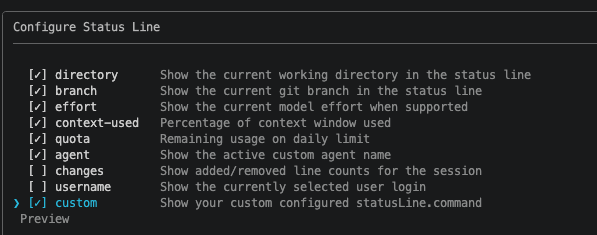
Note: At the time of writing, custom status line support requires experimental features in Copilot CLI.
You can enable them from inside Copilot CLI with:
/experimental on
Step 2: Point Copilot CLI to your script
Next, find your Copilot CLI configuration directory. On my machine, the settings file is under:
~/.copilot/settings.json
Open settings.json and add a statusLine configuration that points to your script:
{
  "statusLine": {
    "type": "command",
    "command": "./statusline-script.sh"
  }
}
If your settings.json already contains other settings, merge the statusLine object into the existing JSON instead of replacing the whole file.
In this example, the script lives in the same directory as settings.json. If you store it somewhere else, update the command value accordingly.
Step 3: Create the status line script
Create a new file named statusline-script.sh in the same directory as your Copilot CLI settings file.
Then make it executable:
chmod +x statusline-script.sh
Start with a simple test
Before doing anything fancy, make sure Copilot CLI can actually run the script. Start with this:
#!/bin/bash
echo "Hello from custom status line!"
Restart Copilot CLI:
/restart
If everything is wired up correctly, you should see the custom message in the status line. This tiny test is worth doing before building the full script, because it separates configuration issues from script issues.
Inspect the payload Copilot sends to the script
Copilot CLI sends a JSON payload to the status line command through standard input. You can print that payload to understand what data is available in your current version of the CLI:
#!/bin/bash
set -eu

payload=$(cat)
echo "Payload: $payload"
Restart Copilot CLI again and inspect the output. This payload is the source for the richer status line we will build next.
Step 4: Build a useful usage and cost status line
After confirming that the custom command works and after inspecting the payload, I replaced the test script with the version below.
This script tries to extract the current context usage, model name, token usage, cost fields, and session duration. If Copilot CLI already provides a cost value in the payload, the script uses that. If it does not, the script attempts a local estimate based on token counts and the pricing table in the script.
Important: Treat local cost calculation as an estimate. Pricing, model availability, and payload fields can change, so always validate the rates and field names against the current Copilot documentation before using the output for reporting or billing decisions.
#!/bin/bash

set -eu

payload=$(cat)
settings_file="$HOME/.copilot/settings.json"

jq_value() {
    printf '%s' "$payload" | jq -r "$1" 2>/dev/null || true
}

is_number() {
    [[ "${1:-}" =~ ^[0-9]+([.][0-9]+)?$ ]]
}

format_tokens() {
    local tokens="${1:-}"

    if ! is_number "$tokens"; then
        printf ""
        return
    fi

    awk -v n="$tokens" 'BEGIN {
        if (n >= 1000000) {
            printf "%.1fM", n / 1000000
        } else if (n >= 1000) {
            printf "%.1fk", n / 1000
        } else {
            printf "%.0f", n
        }
    }'
}

format_usd() {
    local amount="${1:-}"

    if ! is_number "$amount"; then
        printf ""
        return
    fi

    awk -v n="$amount" 'BEGIN {
        if (n > 0 && n < 0.01) {
            printf "$%.4f", n
        } else {
            printf "$%.2f", n
        }
    }'
}

format_duration() {
    local duration_ms="${1:-0}"

    if ! is_number "$duration_ms"; then
        duration_ms=0
    fi

    awk -v ms="$duration_ms" 'BEGIN {
        total_seconds = int(ms / 1000)
        hours = int(total_seconds / 3600)
        minutes = int((total_seconds % 3600) / 60)
        seconds = total_seconds % 60
        printf "%02d:%02d:%02d", hours, minutes, seconds
    }'
}

normalize_model_id() {
    local model="${1:-}"

    printf '%s' "$model" \
        | tr '[:upper:]' '[:lower:]' \
        | sed -E 's/^[^a-z0-9]+//; s/[[:space:]]*\(.*$//; s/[[:space:]_]+/-/g; s/[^a-z0-9.+-]//g; s/-+/-/g; s/^-//; s/-$//'
}

metric_value() {
    local metrics_lines="${1:-}"
    local column="${2:-1}"

    [ -n "$metrics_lines" ] || return 1

    awk -F '\t' -v column="$column" 'NF > 0 && $1 != "" { total += $column; count++ } END {
        if (count > 0) {
            printf "%.0f", total
        } else {
            exit 1
        }
    }' <<EOF
$metrics_lines
EOF
}

display_model_name() {
    local model_id
    model_id=$(normalize_model_id "${1:-}")

    case "$model_id" in
        claude-haiku-4.5) printf "Haiku 4.5" ;;
        claude-sonnet-4|claude-sonnet-4.0) printf "Sonnet 4" ;;
        claude-sonnet-4.5) printf "Sonnet 4.5" ;;
        claude-sonnet-4.6) printf "Sonnet 4.6" ;;
        claude-opus-4.5) printf "Opus 4.5" ;;
        claude-opus-4.6) printf "Opus 4.6" ;;
        claude-opus-4.7) printf "Opus 4.7" ;;
        gpt-4.1) printf "GPT-4.1" ;;
        gpt-5-mini) printf "GPT-5 mini" ;;
        gpt-5.2) printf "GPT-5.2" ;;
        gpt-5.2-codex) printf "GPT-5.2-Codex" ;;
        gpt-5.3-codex) printf "GPT-5.3-Codex" ;;
        gpt-5.4) printf "GPT-5.4" ;;
        gpt-5.4-mini) printf "GPT-5.4 mini" ;;
        gpt-5.4-nano) printf "GPT-5.4 nano" ;;
        gpt-5.5) printf "GPT-5.5" ;;
        gemini-2.5-pro) printf "Gemini 2.5 Pro" ;;
        gemini-3-flash) printf "Gemini 3 Flash" ;;
        gemini-3.1-pro) printf "Gemini 3.1 Pro" ;;
        grok-code-fast-1) printf "Grok Code Fast 1" ;;
        raptor-mini) printf "Raptor mini" ;;
        goldeneye) printf "Goldeneye" ;;
        "") printf "" ;;
        *) printf '%s' "${1:-}" ;;
    esac
}

pricing_rates() {
    local model_id
    model_id=$(normalize_model_id "${1:-}")

    # GitHub Copilot usage-based billing starts June 1, 2026.
    # Rates are USD per 1M tokens from the Copilot models-and-pricing docs.
    # Columns: input cached_input cache_write output. Local calculations are estimates
    # unless the status-line payload already includes a GitHub-provided USD total.
    case "$model_id" in
        gpt-4.1) printf "2.00 0.50 0 8.00" ;;
        gpt-5-mini|raptor-mini) printf "0.25 0.025 0 2.00" ;;
        gpt-5.2|gpt-5.2-codex|gpt-5.3-codex) printf "1.75 0.175 0 14.00" ;;
        gpt-5.4) printf "2.50 0.25 0 15.00" ;;
        gpt-5.4-mini) printf "0.75 0.075 0 4.50" ;;
        gpt-5.4-nano) printf "0.20 0.02 0 1.25" ;;
        gpt-5.5) printf "5.00 0.50 0 30.00" ;;
        claude-haiku-4.5) printf "1.00 0.10 1.25 5.00" ;;
        claude-sonnet-4|claude-sonnet-4.0|claude-sonnet-4.5|claude-sonnet-4.6) printf "3.00 0.30 3.75 15.00" ;;
        claude-opus-4.5|claude-opus-4.6|claude-opus-4.7) printf "5.00 0.50 6.25 25.00" ;;
        gemini-2.5-pro) printf "1.25 0.125 0 10.00" ;;
        gemini-3-flash) printf "0.50 0.05 0 3.00" ;;
        gemini-3.1-pro) printf "2.00 0.20 0 12.00" ;;
        grok-code-fast-1) printf "0.20 0.02 0 1.50" ;;
        *) return 1 ;;
    esac
}

calculate_model_cost_usd() {
    local model="${1:-}"
    local input_tokens="${2:-0}"
    local output_tokens="${3:-0}"
    local cache_read_tokens="${4:-0}"
    local cache_write_tokens="${5:-0}"
    local rates input_rate cached_input_rate cache_write_rate output_rate

    rates=$(pricing_rates "$model") || return 1
    set -- $rates
    input_rate="$1"
    cached_input_rate="$2"
    cache_write_rate="$3"
    output_rate="$4"

    awk \
        -v input_tokens="$input_tokens" \
        -v output_tokens="$output_tokens" \
        -v cache_read_tokens="$cache_read_tokens" \
        -v cache_write_tokens="$cache_write_tokens" \
        -v input_rate="$input_rate" \
        -v cached_input_rate="$cached_input_rate" \
        -v cache_write_rate="$cache_write_rate" \
        -v output_rate="$output_rate" \
        'BEGIN {
            total = ((input_tokens * input_rate) + (cache_read_tokens * cached_input_rate) + (cache_write_tokens * cache_write_rate) + (output_tokens * output_rate)) / 1000000
            printf "%.8f", total
        }'
}

calculate_model_metrics_cost_usd() {
    local metrics_lines="${1:-}"
    local total="0"
    local found="false"
    local metric_model input_tokens output_tokens cache_read_tokens cache_write_tokens cost

    [ -n "$metrics_lines" ] || return 1

    while IFS=$'\t' read -r metric_model input_tokens output_tokens cache_read_tokens cache_write_tokens; do
        [ -n "${metric_model:-}" ] || continue
        cost=$(calculate_model_cost_usd "$metric_model" "${input_tokens:-0}" "${output_tokens:-0}" "${cache_read_tokens:-0}" "${cache_write_tokens:-0}" || true)
        [ -n "$cost" ] || continue

        total=$(awk -v a="$total" -v b="$cost" 'BEGIN { printf "%.8f", a + b }')
        found="true"
    done <<EOF
$metrics_lines
EOF

    if [ "$found" = "true" ]; then
        printf '%s' "$total"
    else
        return 1
    fi
}

current_context_tokens=$(jq_value '.context_window.current_context_tokens // .currentTokens // empty')
displayed_context_limit=$(jq_value '.context_window.displayed_context_limit // .context_window.limit // .contextWindow.displayedContextLimit // empty')
used_percentage=$(jq_value '.context_window.used_percentage // .contextWindow.usedPercentage // empty')
total_duration_ms=$(jq_value '.cost.total_duration_ms // .cost.totalDurationMs // .total_duration_ms // .totalDurationMs // 0')

model=$(jq_value '
    def text:
        if type == "object" then (.display_name // .displayName // .name // .id // empty)
        else tostring
        end;
    [
        .currentModel?,
        .cost.model?,
        .model?,
        .model.display_name?,
        .model.displayName?,
        .model.name?,
        .model.id?,
        .selectedModel?,
        .session.selectedModel?,
        .data.currentModel?
    ]
    | map(select(. != null and . != ""))
    | first // empty
    | text
')

if [ -z "$model" ] && [ -f "$settings_file" ]; then
    model=$(jq -r '.model // empty' "$settings_file" 2>/dev/null || true)
fi

payload_cost_usd=$(jq_value '
    def as_num:
        if type == "number" then .
        elif type == "string" and test("^[0-9]+([.][0-9]+)?$") then tonumber
        else empty
        end;
    [
        .cost.total_cost_usd?,
        .cost.totalCostUsd?,
        .cost.total_usd?,
        .cost.totalUsd?,
        .cost.usd?,
        .cost.amount_usd?,
        .cost.amountUsd?,
        .cost.aic_gross_amount?,
        .cost.aicGrossAmount?,
        .usage.cost_usd?,
        .usage.costUsd?,
        .usage.aic_gross_amount?,
        .usage.aicGrossAmount?,
        .aic_gross_amount?,
        .aicGrossAmount?,
        .total_cost_usd?,
        .totalCostUsd?
    ]
    | map(as_num)
    | first // empty
')

payload_ai_credits=$(jq_value '
    def as_num:
        if type == "number" then .
        elif type == "string" and test("^[0-9]+([.][0-9]+)?$") then tonumber
        else empty
        end;
    [
        .cost.aiCredits?,
        .cost.ai_credits?,
        .cost.aic_quantity?,
        .cost.aicQuantity?,
        .usage.aiCredits?,
        .usage.ai_credits?,
        .usage.aic_quantity?,
        .usage.aicQuantity?,
        .aic_quantity?,
        .aicQuantity?
    ]
    | map(as_num)
    | first // empty
')

input_tokens=$(jq_value '
    def as_num:
        if type == "number" then .
        elif type == "string" and test("^[0-9]+([.][0-9]+)?$") then tonumber
        else empty
        end;
    [
        .usage.inputTokens?,
        .usage.input_tokens?,
        .token_usage.inputTokens?,
        .token_usage.input_tokens?,
        .cost.usage.inputTokens?,
        .cost.usage.input_tokens?,
        .cost.inputTokens?,
        .cost.input_tokens?,
        .inputTokens?,
        .input_tokens?,
        .data.usage.inputTokens?
    ]
    | map(as_num)
    | first // empty
')

output_tokens=$(jq_value '
    def as_num:
        if type == "number" then .
        elif type == "string" and test("^[0-9]+([.][0-9]+)?$") then tonumber
        else empty
        end;
    [
        .usage.outputTokens?,
        .usage.output_tokens?,
        .token_usage.outputTokens?,
        .token_usage.output_tokens?,
        .cost.usage.outputTokens?,
        .cost.usage.output_tokens?,
        .cost.outputTokens?,
        .cost.output_tokens?,
        .outputTokens?,
        .output_tokens?,
        .data.usage.outputTokens?
    ]
    | map(as_num)
    | first // empty
')

cache_read_tokens=$(jq_value '
    def as_num:
        if type == "number" then .
        elif type == "string" and test("^[0-9]+([.][0-9]+)?$") then tonumber
        else empty
        end;
    [
        .usage.cacheReadTokens?,
        .usage.cachedInputTokens?,
        .usage.cached_input_tokens?,
        .token_usage.cacheReadTokens?,
        .token_usage.cached_input_tokens?,
        .cost.usage.cacheReadTokens?,
        .cost.usage.cached_input_tokens?,
        .cost.cacheReadTokens?,
        .cost.cached_input_tokens?,
        .cacheReadTokens?,
        .cached_input_tokens?,
        .data.usage.cacheReadTokens?
    ]
    | map(as_num)
    | first // empty
')

cache_write_tokens=$(jq_value '
    def as_num:
        if type == "number" then .
        elif type == "string" and test("^[0-9]+([.][0-9]+)?$") then tonumber
        else empty
        end;
    [
        .usage.cacheWriteTokens?,
        .usage.cache_write_tokens?,
        .token_usage.cacheWriteTokens?,
        .token_usage.cache_write_tokens?,
        .cost.usage.cacheWriteTokens?,
        .cost.usage.cache_write_tokens?,
        .cost.cacheWriteTokens?,
        .cost.cache_write_tokens?,
        .cacheWriteTokens?,
        .cache_write_tokens?,
        .data.usage.cacheWriteTokens?
    ]
    | map(as_num)
    | first // empty
')

metrics_lines=$(jq_value '
    def as_entries:
        if type == "array" then
            map({ key: (.model // .modelId // .model_id // .name // .id), value: . })
        elif type == "object" then
            to_entries
        else
            []
        end;
    def usage_of:
        .usage? // .tokenUsage? // .token_usage? // .;
    [
        .modelMetrics?,
        .data.modelMetrics?,
        .cost.modelMetrics?,
        .usage.modelMetrics?,
        .session.modelMetrics?,
        .models?,
        .usage.models?,
        .token_usage.models?,
        .tokenUsage.models?
    ]
    | map(select(. != null))
    | first // {}
    | as_entries[]?
    | [
        (.key // .value.model // .value.modelId // .value.model_id // .value.name // .value.id),
        (.value | usage_of | .inputTokens // .input_tokens // 0),
        (.value | usage_of | .outputTokens // .output_tokens // 0),
        (.value | usage_of | .cacheReadTokens // .cachedInputTokens // .cached_input_tokens // .cache_read_tokens // 0),
        (.value | usage_of | .cacheWriteTokens // .cache_write_tokens // 0)
    ]
    | select(.[0] != null and .[0] != "")
    | @tsv
')

metrics_model_count=$(printf '%s' "$metrics_lines" | awk -F '\t' 'NF > 0 && $1 != "" { count++ } END { print count + 0 }')

current_context_tokens_formatted=$(format_tokens "$current_context_tokens")
displayed_context_limit_formatted=$(format_tokens "$displayed_context_limit")
total_duration=$(format_duration "$total_duration_ms")

pct_int=$(awk -v pct="$used_percentage" -v current="$current_context_tokens" -v limit="$displayed_context_limit" 'BEGIN {
    if (pct ~ /^[0-9]+([.][0-9]+)?$/) {
        value = pct
    } else if (current ~ /^[0-9]+([.][0-9]+)?$/ && limit ~ /^[0-9]+([.][0-9]+)?$/ && limit > 0) {
        value = (current / limit) * 100
    } else {
        exit 1
    }

    if (value < 0) value = 0
    if (value > 100) value = 100
    printf "%.0f", value
}' 2>/dev/null || true)

gauge=""
if [ -n "$pct_int" ]; then
    filled=$((pct_int / 10))
    empty=$((10 - filled))

    i=0; while [ $i -lt $filled ]; do gauge="${gauge}█"; i=$((i + 1)); done
    i=0; while [ $i -lt $empty ]; do gauge="${gauge}░"; i=$((i + 1)); done

    gauge="${gauge} ${pct_int}%"
fi

model_display=$(display_model_name "$model")
cost_usd=""
cost_is_estimated="false"

if is_number "$payload_cost_usd"; then
    cost_usd="$payload_cost_usd"
elif is_number "$payload_ai_credits"; then
    cost_usd=$(awk -v credits="$payload_ai_credits" 'BEGIN { printf "%.8f", credits * 0.01 }')
elif [ -n "$metrics_lines" ]; then
    cost_usd=$(calculate_model_metrics_cost_usd "$metrics_lines" || true)
    [ -n "$cost_usd" ] && cost_is_estimated="true"
elif [ -n "$model" ] && { [ -n "$input_tokens" ] || [ -n "$output_tokens" ] || [ -n "$cache_read_tokens" ] || [ -n "$cache_write_tokens" ]; }; then
    cost_usd=$(calculate_model_cost_usd "$model" "${input_tokens:-0}" "${output_tokens:-0}" "${cache_read_tokens:-0}" "${cache_write_tokens:-0}" || true)
    [ -n "$cost_usd" ] && cost_is_estimated="true"
elif [ -n "$model" ] && is_number "$current_context_tokens"; then
    # Last-resort approximation for status-line payloads that only expose the
    # active context window. This treats current context tokens as input tokens;
    # real Copilot billing may also include output/cache tokens across requests.
    cost_usd=$(calculate_model_cost_usd "$model" "$current_context_tokens" 0 0 0 || true)
    [ -n "$cost_usd" ] && cost_is_estimated="true"
fi

segments=()
context_segment="🧠"

if [ -n "$gauge" ]; then
    context_segment="${context_segment} ${gauge}"
elif [ -n "$current_context_tokens_formatted" ] && [ -n "$displayed_context_limit_formatted" ]; then
    context_segment="${context_segment} Context"
fi

if [ -n "$current_context_tokens_formatted" ] && [ -n "$displayed_context_limit_formatted" ]; then
    context_segment="${context_segment} ${current_context_tokens_formatted}/${displayed_context_limit_formatted}"
fi

segments+=("$context_segment")

if [ "$metrics_model_count" -gt 1 ]; then
    if [ -n "$model_display" ]; then
        segments+=("✱ $model_display +$((metrics_model_count - 1))")
    else
        segments+=("✱ ${metrics_model_count} models")
    fi
elif [ -n "$model_display" ]; then
    segments+=("✱ $model_display")
fi

if [ -n "$cost_usd" ]; then
    cost_segment=$(format_usd "$cost_usd")
    if [ -n "$cost_segment" ]; then
        if [ "$cost_is_estimated" = "true" ]; then
            segments+=("~$cost_segment")
        else
            segments+=("$cost_segment")
        fi
    fi
fi

segments+=("⏱️ $total_duration")

printf '%s' "${segments[0]}"
index=1
while [ $index -lt ${#segments[@]} ]; do
    printf ' | %s' "${segments[$index]}"
    index=$((index + 1))
done
After saving the file, restart Copilot CLI again:
/restart
You should now see a richer custom status line.

What the script displays
The output is assembled from small segments:
🧠shows context window usage.- The progress bar gives a quick visual indication of how full the context is.
64.0k/128.0kshows current context tokens and the displayed context limit when those values are available.✱ Sonnet 4.5shows the active model using a friendlier display name.~$0.04shows an estimated cost. The~prefix means the value was calculated locally rather than provided directly by Copilot CLI.⏱️ 00:12:34shows the session duration.
The script also handles sessions that use multiple models. In that case, it can display the current model plus a count of the additional models found in the metrics payload.
A few notes before you rely on the numbers
The status line is useful, but it is not a billing system. A few things are worth keeping in mind:
- If Copilot CLI provides a cost value in the payload, the script prefers that value.
- If the script calculates cost locally, it is only an estimate.
- Pricing rates can change, so keep the
pricing_ratesfunction up to date. - Payload field names may change while the feature is experimental.
- If only context window data is available, the script uses a last-resort approximation and treats current context tokens as input tokens.
That last point is especially important. It is useful for a rough signal, but it should not be confused with the actual cost of a full conversation.
Conclusion
Customizing the Copilot CLI status line is a small change that can make daily terminal work feel much smoother. By wiring the status line to a script, you can decide exactly what information matters for your workflow and present it in a compact way.
For me, context usage, model name, estimated cost, and elapsed time are the most useful pieces of information. Your version might show something completely different: repository name, branch, current task, environment, or anything else your script can calculate.
Start with the simple Hello from custom status line! example, inspect the payload, and then build the status line that helps you work faster. Small terminal upgrades are still upgrades — and this one is a fun little quality-of-life improvement.
